
AI Workout Coach: How Your Training Log Becomes Real Coaching
How AI turns your sets, reps and weights into post-workout summaries, weekly coaching tips, adaptive 4-week plans and a chat coach that knows your training.
October 28, 2026 · 7 min read
Most lifters who keep a log never really read it. The numbers go in (185 lbs for 3 sets of 8 on bench, a note about a cranky shoulder), but working out what those numbers mean takes time and some coaching know-how. So the log becomes a record of what happened instead of a guide to what to do next.
That gap is where AI coaching earns its keep. An AI can read hundreds of sets in a second, and when it reads your sets, its advice gets specific instead of generic. This post walks through how that works in practice, using Gym AI Tracker as the example, plus what you can borrow even if you track with pen and paper.
Why a log alone doesn't coach you
A training log answers "what did I do?" A coach answers three harder questions:
- How did that session compare with the last few? Was 185 x 8 a PR, a plateau or just a bad day?
- Is the week balanced? Lots of pressing and hardly any pulling? Legs skipped twice?
- What should next week look like? Add weight, add reps, hold steady or back off?
Answering those means comparing across sessions, muscle groups and weeks. It's slow by hand and trivial for software. Turning the patterns into plain-language advice is the part modern AI is good at, as long as it's fed real data.
The data that actually matters
Good coaching starts with good inputs. Roughly in order of importance:
- Sets, reps and load for every exercise: the core of any log.
- Exercise type. Weighted lifts, bodyweight moves and timed holds are measured differently. A 60-second plank isn't "60 reps."
- Session length and rest. Shows whether you're rushing or dragging.
- How the session felt. A simple Easy / Moderate / Hard rating tells a plan more than you'd expect.
- Body weight, so advice like protein targets can be scaled to you.
- Nutrition, if you track it. Stalled lifts and a big calorie deficit often go together.
In Gym AI Tracker almost all of this is captured while you train. You log sets on the active workout screen, the app tracks active and rest time, and you rate the session when you finish. There's nothing extra to fill in.
Step 1: A summary after every workout
When you tap Finish Workout, the app first checks every set against your history for personal records. It tracks four kinds per exercise: heaviest single lift, best volume in one set (weight x reps), most reps, and longest hold for timed exercises. Those PRs are calculated straight from your log, not guessed by the AI.
Then the AI writes a short AI Summary of the session:
- A two-to-three sentence read on volume, intensity and effort
- Achievements, including any PRs you hit
- Tips on technique for the exercises you actually did
- Nutrition ideas for recovery, scaled to your body weight if you've entered it
The summary is saved with the workout, so you can reread it in History before your next session. It's included on the free plan.
Borrow this without any app: after each session, write one line answering "better, same or worse than last time, and why?" That one habit gets you most of the value of a summary.
Step 2: A weekly check-in with Smart Coaching
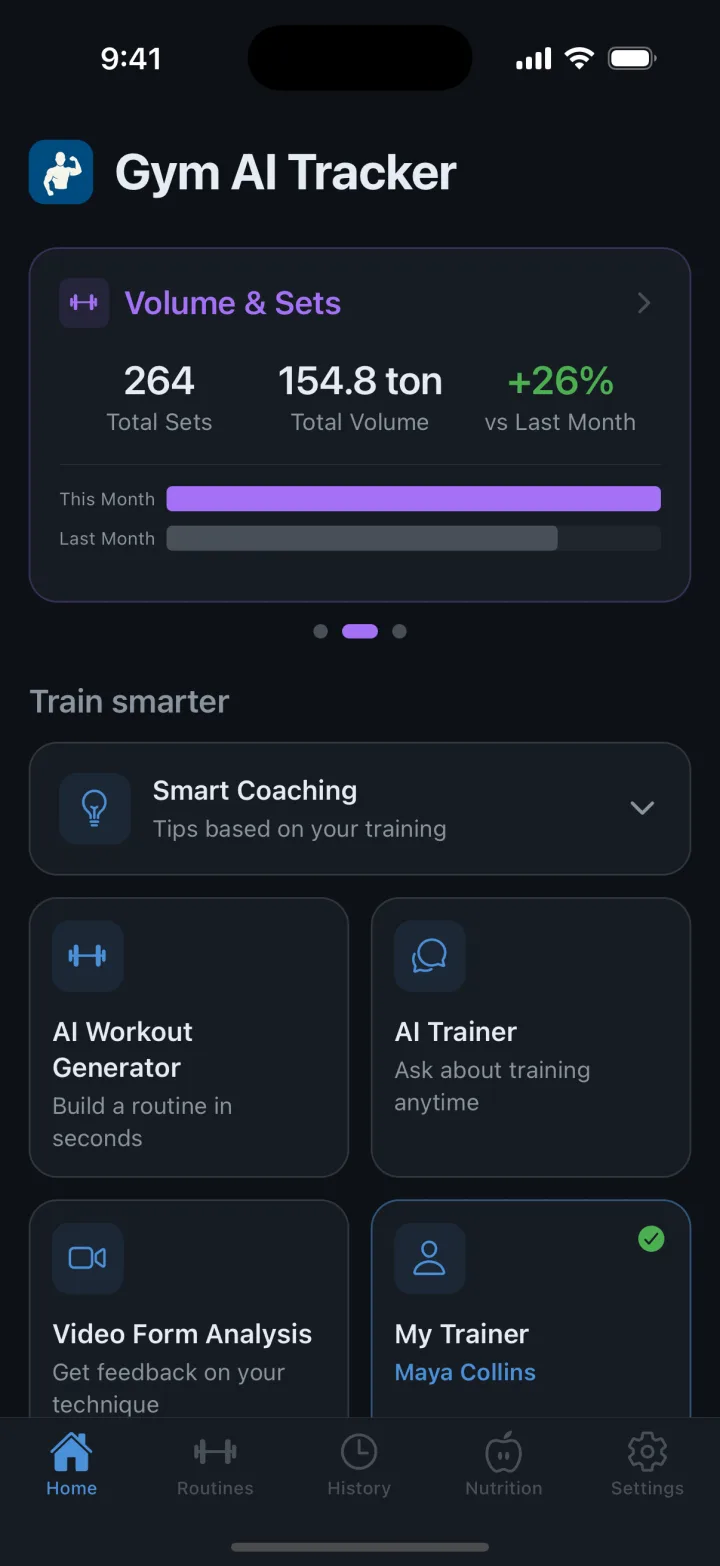
One workout tells you little; a week tells you a lot. Smart Coaching on the home screen looks at your last seven days: how many workouts you did, your average session length, your week streak, how many sets each muscle group got and, if you log food, your average calories and protein against your goals.
It comes back with a one-line verdict and a handful of insights, each marked as something going well, something to watch or a concrete suggestion. A typical note might flag that chest got far more sets than back this week, or that protein is running below your target. Short, specific and based on your numbers.
Borrow this without any app: once a week, count your hard sets per muscle group. Lopsided numbers are the first thing most coaches fix.
Step 3: A 4-week plan that adapts to you
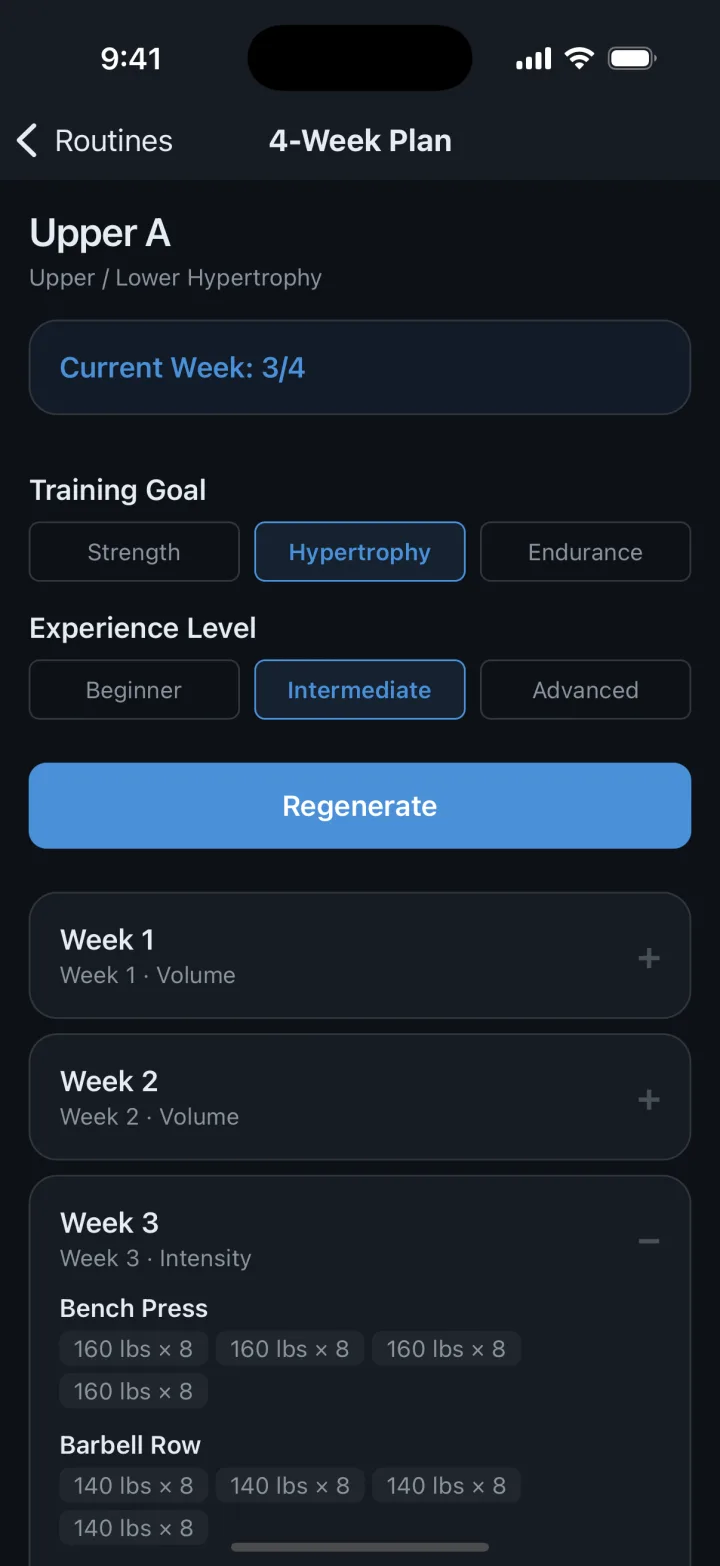
Summaries and insights look backward. A plan looks forward. For any day in your routine, Gym AI Tracker can build an AI 4-Week Plan from your training goal (strength, hypertrophy or endurance), your experience level and the most recent weight and reps you hit on each exercise.
The structure follows classic periodization:
- Weeks 1–3 raise the challenge step by step, adding weight, trimming reps or adding volume depending on the goal. Strength plans center on heavy sets of 3–6 reps, hypertrophy on 8–12 and endurance on 15–20.
- Week 4 is a deload with less volume and lighter loads, so you recover before the next block.
During the workout, the prescribed numbers appear as Suggested values you can tap to apply. The adaptive part happens after each session. Rate it Easy and next week's targets go up a little (a few percent more weight or a rep or two); rate it Hard and they come down by a similar amount; Moderate keeps the plan as written. A plan that reacts to how you're actually doing beats a spreadsheet you abandon in week two.
Need a routine first? The AI Workout Generator builds one from your goal, level, 2–6 training days a week, session length, available equipment (barbell, dumbbells, cables, machines, bands and more), preferred split, focus areas and any injuries or limits you type in. It's free, and you can edit everything it creates.
Step 4: A chat coach that has read your log
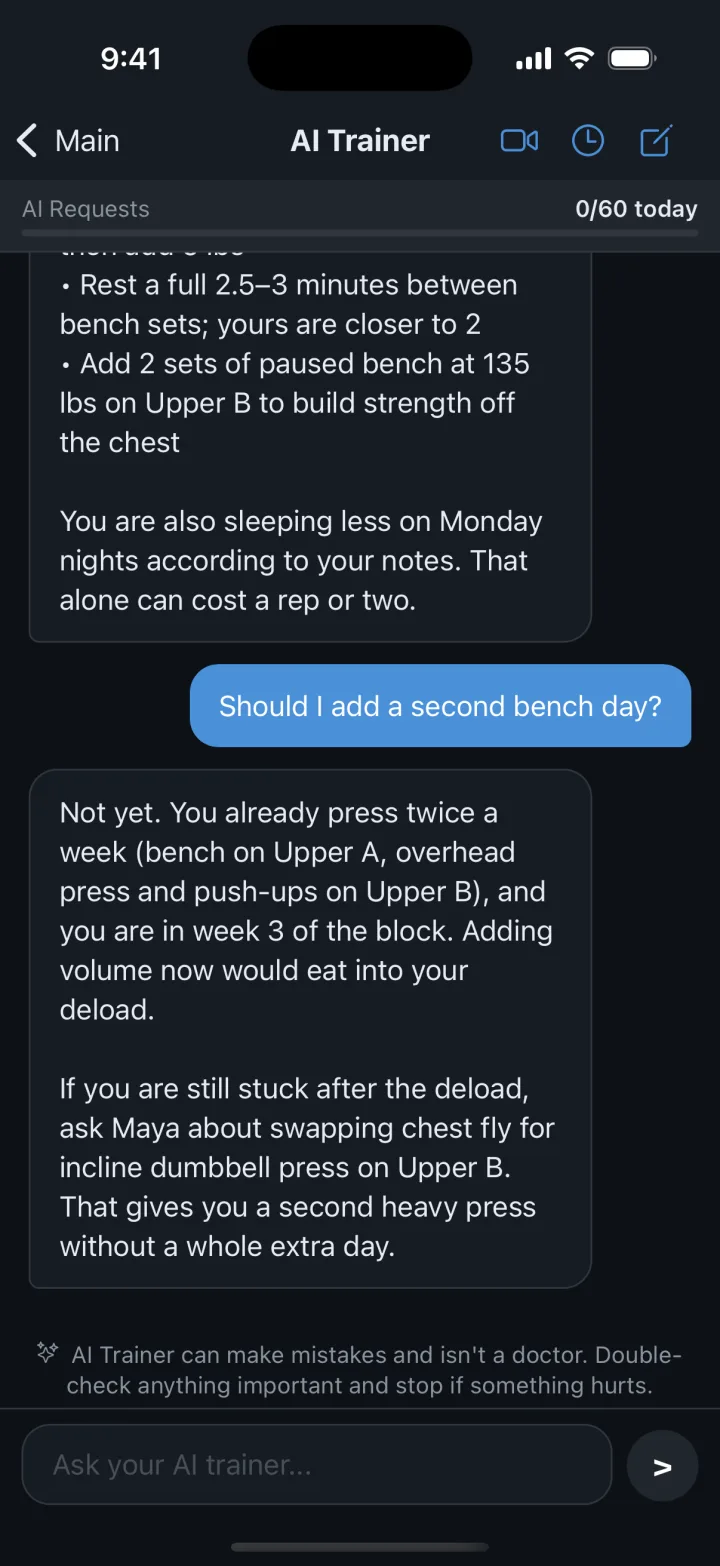
A general-purpose chatbot can explain what a deload is. It can't tell you whether you need one, because it has never seen your training. The AI Trainer chat in Gym AI Tracker gets a summary of your data with every conversation: recent workouts, best sets per exercise, your routines, body weight and, if you track food, your seven-day nutrition averages against your targets.
So when you ask "Should I add a second bench day?", the answer looks at your current pressing volume, your recent bench sessions and how your week is laid out, instead of reciting a textbook answer about frequency.
Questions that work well with a coach that knows your history:
- "Review my last workout. What should I change next time?"
- "My squat hasn't moved in three weeks. What would you adjust?"
- "Am I eating enough protein for how I'm training?"
- "I only have 45 minutes on Thursdays. How should I shorten leg day?"
Each answer comes with a few suggested follow-up questions, and past conversations are saved so you can pick up where you left off.
Simple nudges matter too
Not everything needs AI. Some of the most useful cues in Gym AI Tracker are plain logic, and they're free:
- Pre-filled sets from your last session, so you always know the number to beat
- Last workout comparison right on the exercise screen
- A progressive overload prompt: hit the same top weight three sessions in a row and the app asks whether you're ready for 5 lbs more
- A PR badge the moment a set beats your record
Add a rest timer that also runs as a Live Activity on your lock screen, and logging stays fast enough to keep up between sets. That speed is what makes the AI layer worth anything, because AI coaching is only as good as the log underneath it.
What AI coaching can't do
AI makes a strong second opinion and a tireless analyst. It doesn't replace judgment:
- It only knows what you log. Skipped sets, mislabeled exercises or unlogged sessions lead to wrong conclusions.
- It can't feel your body. Sharp pain, numbness or a joint that "just doesn't feel right" is a reason to stop and see a professional, not to ask a chatbot.
- It can be wrong. Every AI result in the app carries a short note saying so, and none of it is medical advice. Treat suggestions like advice from a knowledgeable training partner: weigh them, don't just obey them.
What's free and what's paid
- Free: workout logging, up to three of your own routines, PR tracking, the overload prompt, the AI Workout Generator and post-workout AI Summaries, with a small daily AI allowance.
- Premium: unlimited routines, cloud sync across devices, Smart Coaching, AI warm-ups, adaptive 4-week plans, advanced analytics and data export.
- Pro: everything in Premium plus the AI Trainer chat and video form analysis.
The takeaway
The smart part of AI coaching is really the log. Consistent sets, honest session ratings and an occasional body weight entry give any coach, human or AI, something real to work with. Gym AI Tracker's job is to make that log quick to keep and then put it to work: a summary after every session, a weekly check-in, a plan that adjusts to you and a coach you can question whenever you want.